You can now easily buy AI tools with a Steam card. The process starts by exchanging your card code for a digital dollar (USDT) on Swapforless.
You then deposit this liquidity into your Kazawallet to issue a virtual Visa card designed for SaaS subscription payments. This path allows you to fund your Plus subscription or top up your API Key without needing a traditional bank account.
Can Gaming Credits Be Used for AI Services?
In 2026, many designers and programmers are looking for creative ways to use their digital assets. If you have a Steam card code you don't need, you can redirect its value to power your productivity and freelance work.
In short, you can unlock that value and use it to buy AI tools with a Steam card, giving you access to the most powerful generative AI models.
To understand how to keep your code safe before you begin, you can read our guide on What Digital Gift Cards Are and How They Work to learn more about their technical standards.
Steps to Buy AI Tools with a Steam Card
Since tools like Midjourney and DeepSeek rely on a recurring subscription model, they do not accept gaming balances directly.
Because security and flexibility are essential, here is the approved technical path to turn your card into a payment engine for SaaS services:
Step 1: Get Liquidity via Swapforless: Log into the Swapforless platform and exchange your unredeemed Steam card for the stable cryptocurrency USDT. This guarantees your card’s value is turned into a global digital dollar protected from market volatility.
Step 2: Generate a Virtual Visa via Kazawallet: Once you receive your USDT, top up your Kazawallet account. This platform lets you instantly issue a virtual credit card that works seamlessly on global websites that require precise, fast payment processing.
Step 3: Activate Your Tool Subscription: Using your new virtual Visa details, head over to your desired AI platform and activate your payment option just like you would with a traditional bank card.
Steps to Exchange Steam USA Card to USDT Kazawallet
To successfully exchange your balance from Steam USA to USDT Kazawallet via Swapforless, follow these steps:
- Log in to your Swapforless account: Start by visiting the official platform website and logging in. If you don’t have an account, the sign-up process is quick and only takes a few minutes.
- From the homepage, select Steam USA to send
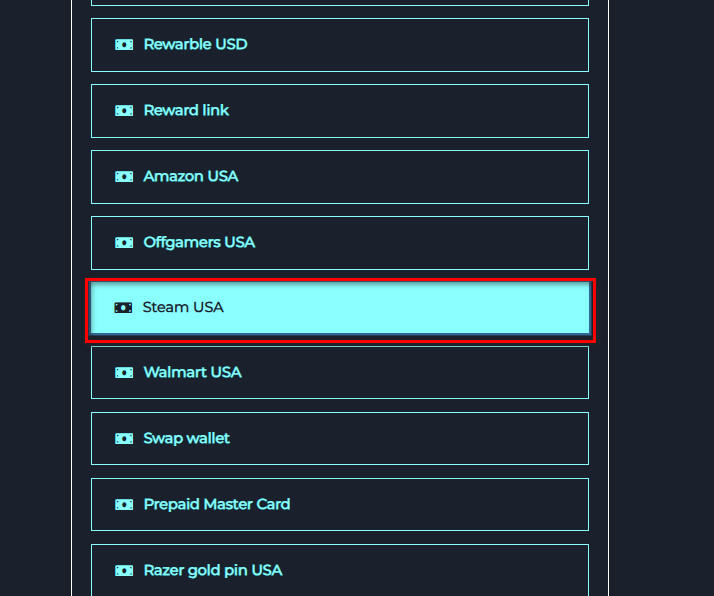
- USDT Kazawallet to receive.
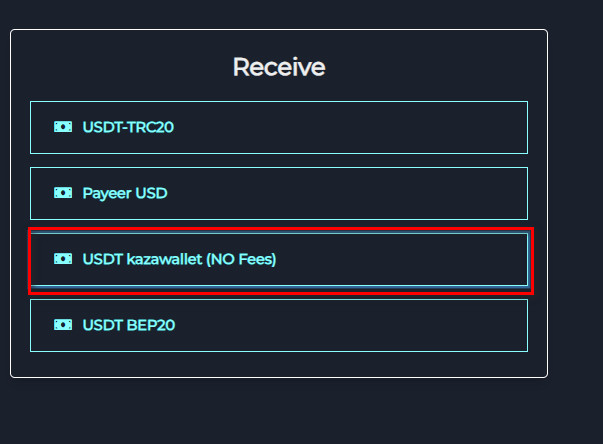
- Enter the exchange amount: Enter the amount you wish to exchange from your Steam USA balance to USDT Kazawallet.
- Enter the address: Provide your USDT Kazawallet wallet address, as the exchanged funds will be sent to this number.
- Create the exchange request: Click the “Create” button to start the exchange request.
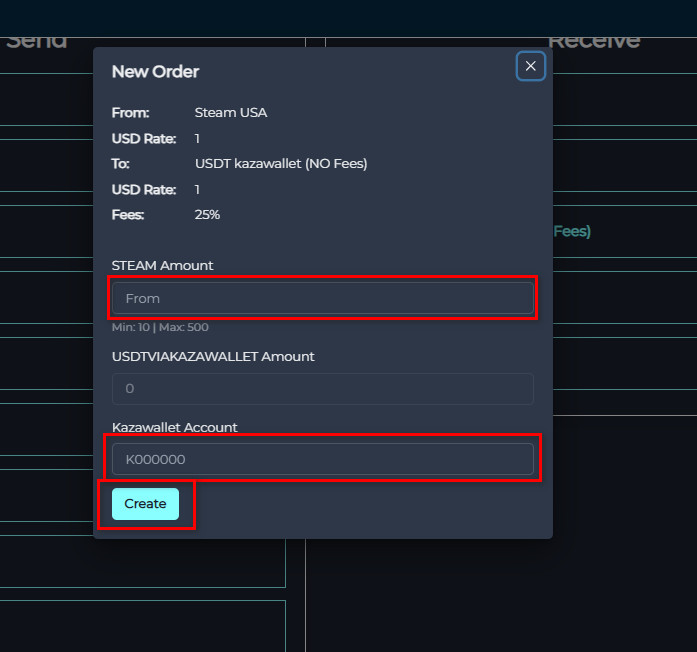
- Fill in the order details: You will be directed to a new page to enter the exchange details, such as the Steam card’s code.
- Complete the exchange: After ensuring all the information is correct, click the “Send” button to complete the order.
Notes:
- This request is processed manually.
- Please add Steam cards (US Steam cards only) below.
- Each card’s code must be entered in a separate field with its value in dollars next to it.
- You can add more cards by clicking the “Add Card” button.
- The expected processing time for your request is 24 hours, depending on the order volume.
- Please ensure all entered information is correct (incorrect information may lead to the cancellation or delay of your order).
After verification, the USDT balance will be sent directly to your Kazawallet.
Frequently Asked Questions (FAQ)
Can I pay Midjourney or Perplexity directly with a Steam code?
No, these sites only accept credit cards. The solution is to swap your card for USDT via Swapforless, then use a Kazawallet virtual Visa as a professional SaaS payment method.
Can I use a Steam wallet balance that is already loaded onto my account?
No. The exchange is only available for new, unredeemed gift card codes that have not been activated on personal accounts.
What is the best way to avoid virtual card rejection on AI websites?
Virtual Visa cards issued by Kazawallet are specifically designed to match global payment systems and seamlessly support monthly subscription models without any technical glitches.
The Bottom Line
Buying AI tools with a Steam card is now fully possible. All you need to do is use Swapforless as a financial bridge to get your liquidity, top up your digital wallet, and use your virtual card to boost your work and production. Instead of spending money purely on entertainment, let your games fund your AI tools.